
Digital Portfolio
TIM videos are hosted on YouTube. If YouTube is blocked on your network, please use the following link:
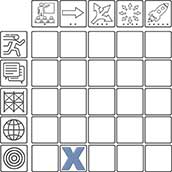
Goal Directed Learning | Adoption Level
Subject: Social Studies
Video Transcription
[Teacher voiceover]
They have a folder, a student folder, and they save everything they do. And then at the end of the year I drag all of their work onto the desktop and I burn a CD, so they get an electronic CD portfolio of all of their work at the end of the year.
[Student 1 voiceover]
We have all of our information, stuff on reading that we’re doing, whatever we’ve done in writing, our poetry, so everything’s organized in a folder. Like this is our reading book and whatever we write, we have vocabulary words, we save it on here; when we’re done with the book we’ll print it out and paste it in a book.
[Student 2 speaking]
I have a poet note reflection that somebody else wrote about my work. Reflections basically told what each project represented.
[Teacher voiceover]
And it’s an exceptional way to have copies of all their work. They have all their writing, all their slideshows. We actually made a database, they made a goal for themselves of ten electronic projects; they’ve surpassed that goal. They’ve made more than ten projects this year.
Video Transcription
They have a folder, a student folder, and they save everything they do. And then at the end of the year I drag all of their work onto the desktop and I burn a CD, so they get an electronic CD portfolio of all of their work at the end of the year.
[Student 1 voiceover]
We have all of our information, stuff on reading that we’re doing, whatever we’ve done in writing, our poetry, so everything’s organized in a folder. Like this is our reading book and whatever we write, we have vocabulary words, we save it on here; when we’re done with the book we’ll print it out and paste it in a book.
[Student 2 speaking]
I have a poet note reflection that somebody else wrote about my work. Reflections basically told what each project represented.
[Teacher voiceover]
And it’s an exceptional way to have copies of all their work. They have all their writing, all their slideshows. We actually made a database, they made a goal for themselves of ten electronic projects; they’ve surpassed that goal. They’ve made more than ten projects this year.
Objectives
- To become experts on a particular part of history.
- To select what information is most important when researching the topic.
- To be able to share that knowledge with others, through application toward a presentation.
Procedure
- Two Students choose a chapter, which interests them, from the social studies textbook that we will NOT get to at the end of the year.
- They research it from a variety of sources, including the Internet.
- They create a folder on the computer desktop to collect a minimum of 20 photos, graphs, etc. on their topic.
- They write a script based on the most important information to share with the class on their topic.
- They need to include two people from the period of history to include (one biography for each of the two students) in the iMovie.
- Bring the photos into the iMovie program. Include titles, special effects, transitions, the Ken Burns effect.
- Practice reading the script in short segments, and then record it.
- Link the script to the pictures.
- Add any last effects, or titles, and a music track if desired.
Technology Present
- Computers for all students
- iMovie
Grade Level: 3-5
Note: The TIM is about teaching, not technology. The placement of a lesson on the TIM is based entirely on the teaching practices demonstrated in the lesson and not on the specific technology employed. Effective pedagogy is our concern, not whether the tech involved is the latest, greatest, or most expensive. In fact, most of the sample videos were recorded some time ago as part of the original development of the Technology Integration Matrix. As you view these videos, focus on the teaching practices. When using the TIM-O to observe a lesson, remember that you can display the detailed indicators by clicking the tab on the right if you are completing a Matrix-based observation or are reviewing the TIM profile of a question-based lesson. The TIM Tools Admin Guide contains additional suggestions for observing a lesson and developing a TIM profile.
Video Reference Number: 1128
Active Learning
• Entry: LA MA SC SS
• Adoption: LA MA SC SS
• Adaptation: LA MA SC SS
• Infusion: LA MA SC SS
• Transformation: LA MA SC SS
Collaborative Learning
• Entry: LA MA SC SS
• Adoption: LA MA SC SS
• Adaptation: LA MA SC SS
• Infusion: LA MA SC SS
• Transformation: LA MA SC SS
Constructive Learning
• Entry: LA MA SC SS
• Adoption: LA MA SC SS
• Adaptation: LA MA SC SS
• Infusion: LA MA SC SS
• Transformation: LA MA SC SS
Authentic Learning
• Entry: LA MA SC SS
• Adoption: LA MA SC SS
• Adaptation: LA MA SC SS
• Infusion: LA MA SC SS
• Transformation: LA MA SC
Goal-Directed Learning
• Entry: SS LA MA SC SS
• Adoption: LA MA SC SS
• Adaptation: LA MA SC SS
• Infusion: LA MA SC SS
• Transformation: LA MA SC SS